


{:ru}Пополнение счета{:}{:en}How to replenish the balance{:}
Для этого Вам необходимо зарегистрироваться на сайте chatoptimizer.com Это значит, что Вы создадите свой личный кабинет, в который добавите анкеты Клиенток, и будете пополнять баланс этого личного кабинета, чтобы Девушки могли пользоваться расширением.
Заметим, что если анкета ещё никогда не пользовалась расширением - то ей будет доступно 3 тестовых бесплатных дня
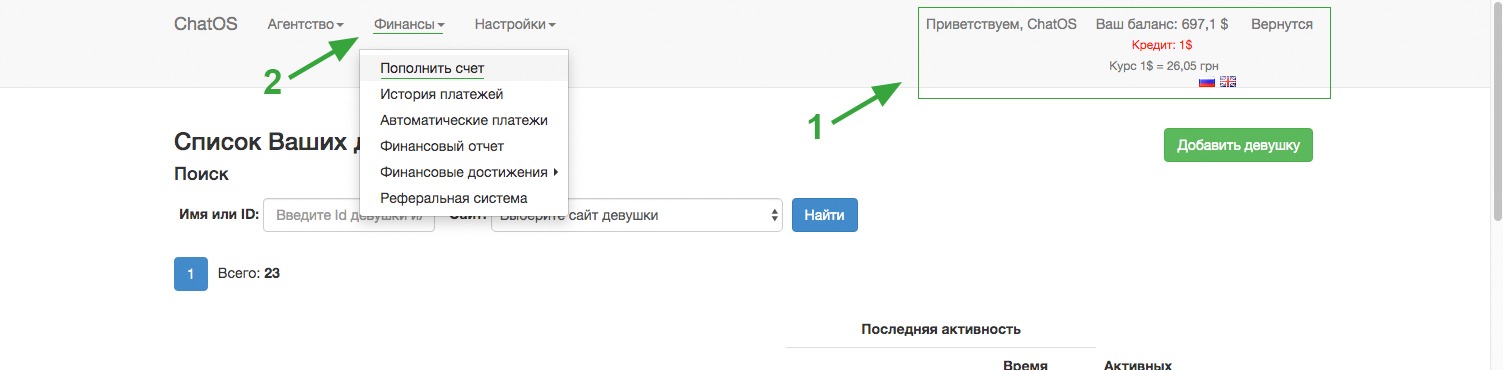
Итак, внимание на рис
Стрелка 1 - так отображается Ваш текущий баланс. Для пополнения счета Вам необходимо перейти в вкладку финансы (стрелка 2) и выбрать пункт “Пополнить счет”
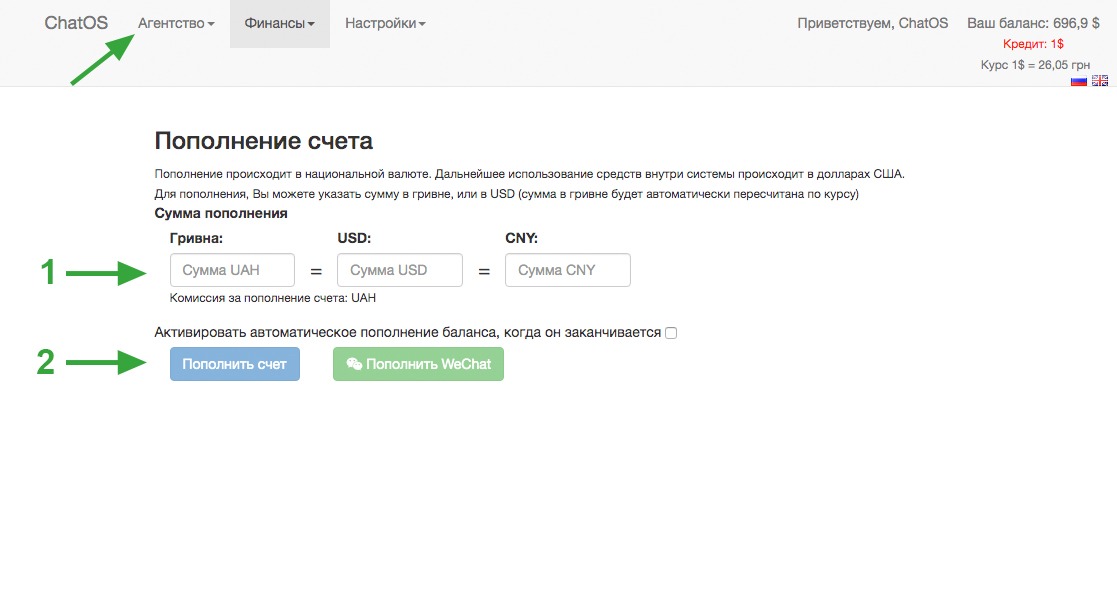
Далее во вкладке пополнения счета вам необходимо указать сумму пополнения и выбрать пункт “Пополнить счет”
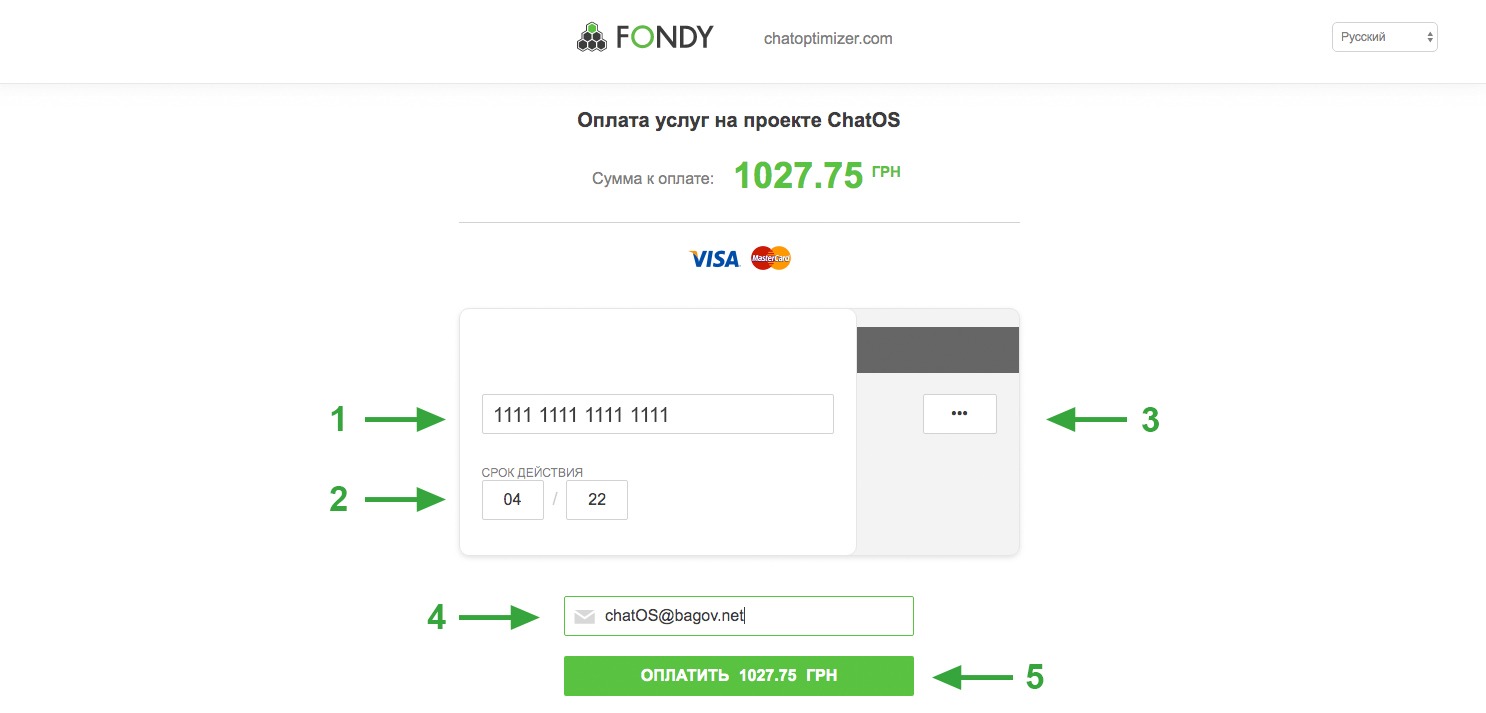
Далее Вам необходимо указать Ваши персональные данные, а именно:
1. Указать номер Вашей карты
2. Заполнить срок действия Вашей карты
3. Указать CVV код. Данный код указан на обратной стороне вашей кредитной карточки (три цифры)
4. Указать Ваш e-mail
5. Подтвердить оплату
Готово. Ваш счет пополнен.
Вы можете пополнить баланс, используя карту любого банка. ChatOS использует систему FONDY.
В данных случаях важно поделиться скриншотом успешного платежа, или фото чека, прислав их в службу техподдержки в телеграмм @chatos_chatos или Skype chatoptimizer.com
Отвечаем на часто задаваемый вопрос “Как пополнить баланс на анкете”
Ваш баланс - общий для всех девушек, которые находятся в Вашем Личном кабинете.
И с этого баланса снимаются средства в момент первого запуска расширения на анкете за сутки (00:00-23:59 по Киеву). То есть средства снимается только за тот день, когда Вы используете расширение.
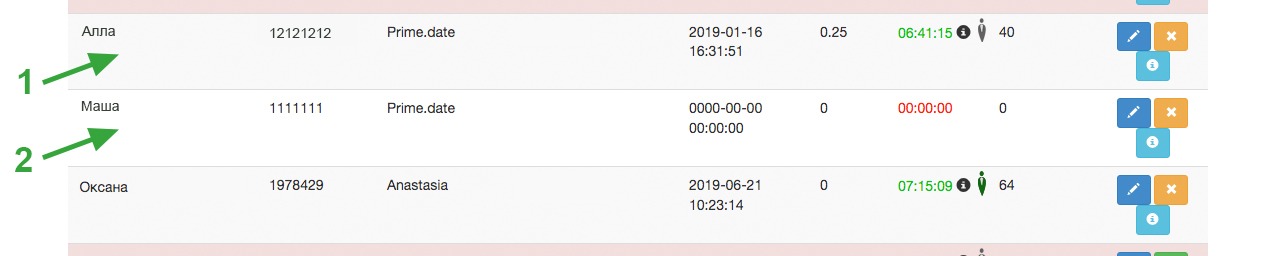
1. Анкета запустила расширение - средства сняты.
2. Анкета не запускала расширение - средства остались на Вашем балансе.
На этом всё:) Теперь Вы можете запускать расширения и работать, а система будет автоматически снимать средства за пользование расширения только по факту Вашего использования расширений - именно в сутки использования по каждой анкете отдельно.
Продуктивной работы!

{:}{:en}To do this, you need to register on the chatoptimizer.com website. This means that you will create your personal account, then add Ladies’ profiles, and then replenish the balance of this personal account so that the Ladies can use the extension.
Note that if the Lady’s account has never used the extension before, then it will have 3 test free days for testing.
So, attention to the picture
Arrow 1 - this is how your current balance is displayed. To replenish your balance, you need to go to the finances tab (arrow 2) and select “Add credits”
Next, in the account replenishment tab (see pic), you need to specify the amount of replenishment and select the item “Add credits”
Next you need to specify your personal data:
1. Specify your card number
2. Fill in the validity period of your card
3. Specify CVV code. This code is listed on the back of your credit card (three digits)
4. Enter your e-mail
5. Confirm payment
It is done. Your account is replenished.
You can replenish the balance using a card of any bank. ChatOS uses the FONDY system.
Also you can transfer money to:
WebMoney Wallet:
R150851026330 - RUB
Z361172514792 - Dollar
In these cases, it is important to share a screenshot of a successful payment or photo, by sending them to the technical support service by Telegram @ chatos_chatos or Skype chatoptimizer.com
We answer the frequently asked question “How to replenish the balance for one Lady’s account”
Your balance is common for all Ladies who are in your Personal Account. And from this balance funds are withdrawn at the time of the first launch of the extension for the day (00: 00-23: 59 Kiev / Moscow time). That is, money are withdrawn only for the day when you use the extension.

If the extension has launched, the funds have been withdrawn.
If the extension has not launched your balance is not changed.
That's all :) Now you can launch extensions and work, and the system will automatically withdraw funds for using the extensions only after its launching. This is only for the day for each Lady in your Personal account separately.
Productive work to you! ?
{:}